SmallSEOTools Plagiarism Checker Review 2026: My Experience, Pros, Cons & Verdict
Plagiarism sits at the center of every writer’s and student’s worries. Luckily, several tools exist to catch it before it causes trouble. These tools, known as plagiarism checkers, promise peace of mind. Yet, not all of them deliver what they claim.
I have tested several plagiarism checkers over time, and one pattern kept showing up.
Most tools only flag clear, word-for-word copying. That creates a problem. You rely on their report, submit your work, and later, someone else points out missed duplication.
Still, one tool stood out during my testing. It managed to catch paraphrased content, patchwork copying, and even unintentional similarities. That tool is SmallSEOTools.
In this review, I will share my hands-on experience and walk through its features, strengths, and limitations.
Let’s dive in!
SmallSEOTools Plagiarism Checker
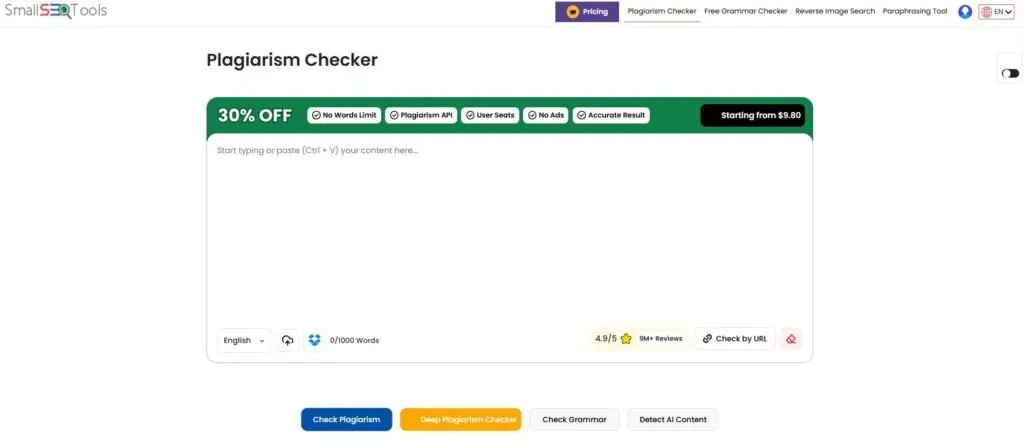
SmallSEOTools’s plagiarism checker scans written content against online sources. It compares submitted text to billions of web pages and academic documents. The tool identifies matching phrases and highlights potential duplicates with colors.
This service operates entirely inside a web browser. No software download or installation is necessary for use. Users simply paste text or upload a file to begin the checking process.
The platform accepts multiple file formats, including PDF and Word.
The platform provides a percentage score for originality. It also shows a list of matched sources for each duplicate passage. This helps users locate and revise problematic sections easily. The tool does not store submitted content after checking.
Key Features Of This Tool
Multiple Input Methods
Users can paste text directly, upload files, or enter a webpage URL. This flexibility suits different content types. The tool handles plain text, documents, and live web pages with equal ease.
Deep Web Scanning
The checker does not limit itself to surface web content. It searches through academic repositories and archived pages. This broader scan catches matches that basic tools often miss.
Sentence-Level Detection
Instead of flagging entire paragraphs, the tool pinpoints exact sentences with issues. Each highlighted sentence shows the matching source. Users see exactly which words caused the alert. This precision allows targeted revisions without guesswork.
Free Usage Access
The service charges nothing for basic plagiarism checks. Users can scan documents without entering payment details. There is no word limit for text files containing up to 1000 words. For documents above this limit, you’ll need a premium subscription.
Built-In Paraphrasing Tool
After detecting duplicates, users can rewrite flagged sentences directly. The integrated paraphrasing feature suggests alternative wordings. One can click a button to rephrase problematic sections. This saves time by eliminating the need for separate rewriting software.
My Personal Experience With SmallSEOTools
Ease Of First-Time Use
When I opened this plagiarism checker for the first time, I didn’t find any issues with the interface or usage. Everything is crystal clear. No hidden menus or complex settings distract the user.
Pasting a sample article into the box takes just a few seconds. Clicking the Check Plagiarism button immediately starts the analysis. The results page shows up without any loading delays. This simplicity means zero frustration for new users.
Accuracy Of Detection
I had already tested several free plagiarism checkers. Most of them handled direct copying quite well. Still, they struggled when it came to paraphrased content or accidental similarities. Because of that, I approached this tool with some doubt.
But things changed once I tested my content here. The tool quickly picked up paraphrased sections that other checkers had missed. In fact, it led me to the sources from which I have gathered the data. That was the first thing that caught my attention. Then, just for checking it, I have pasted a few other blogs as well, and it was right on the spot. It detected all types of plagiarism, regardless of content type.
Speed Of Processing
The tool processes a standard 500-word article in just a few seconds. Uploading a file adds two to three seconds for the transfer. Longer documents of 2000 words take a bit longer, but not that much. These speeds match or beat a few paid alternatives.
The best thing? There are no peak hours. It always maintains its speed, no matter when you check your content. The tool does not slow down significantly with concurrent users.
Interface And Navigation
The website organizes all tools in a left sidebar menu. Clicking the Plagiarism Checker option brings users to the main scanning page. Clear labels and icons guide visitors without confusion. No pop-ups or intrusive elements block the view during use.
After scanning, the results page shows a clear color-coded report. You can easily analyze and interpret the plagiarism reports without anyone’s assistance. Each matched source appears as a clickable link for verification. Users can navigate back to the checker with a single click.
Overall Reliability
The scanner works equally well on Chrome, Firefox, and Edge. No crashes or error messages interrupted a single scanning session. This stability builds confidence in the tool’s daily use.
The free version does not restrict the number of daily checks. Many similar services limit users to three or five scans per day. SmallSEOTools allows unlimited scanning without forcing account creation. This makes it a dependable choice for frequent users.
Pros Of SmallSEOTools
No Registration Required
A great fact about SmallSEOTools is that it doesn’t ask you for registration for basic checks. So, you don’t need to go through a lengthy process before checking your content.
This approach respects user privacy and saves valuable time. Many competing services force registration before showing any results.
Quick Results Delivery
The scanning engine returns reports in under ten seconds for most documents. This speed allows writers to check multiple drafts in a single sitting. No waiting around for minutes like some competitor tools.
Real-time feedback helps users catch issues before final submission. The fast turnaround supports an efficient editing workflow.
Accessible On All Devices
The responsive design adapts to smartphones, tablets, and desktop computers. Phone users see the same text box as laptop users. No mobile app download is necessary for full functionality.
Cross-device support allows checking content anywhere with the internet. Writers can verify drafts on the go without a computer.
Cons Of SmallSEOTools
Lack Of Advanced Filters
The checker does not offer exclusion options for common phrases. Users cannot ignore specific domains or sources from the scan results. This limitation might lead to false positives for widely used terms.
Academic writers often need to exclude quoted material or bibliographies. The tool treats every match equally without allowing customization.
What Type Of Content Can You Check With SmallSEOTools?
Blog Posts And Articles
Bloggers writing for websites can verify their content against existing online posts. The tool catches unintentional similarities with competitor articles or outdated pages. This maintains originality standards for search engine rankings.
Freelance writers often check multiple drafts before client delivery. Quick scans ensure each piece passes basic plagiarism thresholds.
Product Descriptions
E-commerce sellers can test product descriptions for duplicate text. The tool compares listings against millions of online store pages. This prevents selling identical copies, which harms search visibility.
Even short descriptions of fifty words go through the same scan. Marketers use this feature to maintain unique branding across platforms.
Email And Marketing Copy
Marketing teams can scan email newsletters and sales copy before sending. The tool checks for borrowed phrases from competitor campaigns or templates. This ensures the brand voice remains original in customer communications.
Social media managers benefit from originality checks. Short captions and ad text receive the same scanning as long articles.
Final Verdict
SmallSEOTools Plagiarism Checker delivers reliable scanning without charging a fee. Its speed and ease of use make it suitable for students and casual writers. The tool handles most everyday checking needs effectively. Users get accurate results without spending a single dollar.
However, professionals requiring detailed reports may need additional software. The lack of advanced filters limits its use for complex academic work. For basic originality checks, this free tool performs admirably. The free access model removes financial barriers for many people. Try it for quick scans before exploring paid alternatives.